
AI assistant

Shipping

Vibe Coding and Vibe Shipping: start from an idea and Shipping writes the code on your server or Fleet machine, or bring a repository or your code and it deploys it as is. It sets up the server and, when the domain is on a DNS provider connected to Leaflow, the DNS record too. Then it sends you the link once the site is live.BillingNo separate charge. Chats and tasks are billed by the models they use, through the project's model service.

ExampleShipping creates an instance, opens ports and adds a DNS record in the Console, and the site goes live after you approve.

At a glance

WeChat · Shipping

Send me this week’s report from the office computer.

Found it in Documents/Reports. Sent.
  • Find files on office-pcmachine.find
  • Send to WeChatnotify.send
week-45-report.pdf286 KB

Say it in WeChat and the file comes back in the chat. WeCom, Feishu, Telegram and Slack connect through their own bots.

It calls the same operations as the Console.

Shipping calls the same operations as the Console and the API. In your project it creates and changes resources, runs commands and handles files on machines, uses graphical interfaces, searches the web, reads attachments and generates images. When several things need doing at once it works on them separately and brings the results back together.

  • Cloud resources: instances, disks, networking, security groups, records
  • Machines: commands, files, graphical apps, ports and permissions
  • Tasks: at a time, on an interval, on cron, on events
  • Conversation: search, attachments, images, memory and skills

Ask from any page, and changes follow the approval setting you chose.

The search box at the top of the Console is Shipping's way in. It moves a visible cursor when it operates a page, so you can take over at any point. Before a change it follows the approval setting you chose for that chat: automatic review, confirm each change, or run directly.

  • Confirm each change: every change shows its difference and waits for you
  • Automatic review: a model decides first, and what it allows runs straight away
  • Run directly: no pause, including restarts and deletes
Before running
  • Automatic review

    Before resources change or outside services are called, automatic review decides whether to go ahead

  • Confirm each change

    Pauses before resources change or outside services are called, and waits for you

  • Run directly

    Never pauses, even for deletes and restarts

Ask in a chat app and the result comes back there.

Connect WeChat by scanning a code. WeCom, Feishu, Telegram and Slack each connect through their own bot. Once connected, its permissions in your project stay the same, and it calls the same operations as the Console; results, files and reminders come back into the conversation.

  • WeChat connects by scanning; the others take the bot's credentials
  • Each project connects separately, and several platforms can be connected at once
  • A file handled on a machine comes back as an attachment
WeChat · Shipping

Send me this week’s report from the office computer.

Found it in Documents/Reports. Sent.
  • Find files on office-pcmachine.find
  • Send to WeChatnotify.send
week-45-report.pdf286 KB

Tasks run at a set time, or start when an event arrives.

A task can run now, at a set time, on an interval, or on a cron expression. It can also follow EventBus events: name the event you care about and the condition, and it starts when one arrives. Conditions are CEL expressions, with a cooldown of at least 10 seconds during which matching events fold into the next run.

  • Changes to compute and Fleet machines are published to EventBus
  • Each run records its steps, tool calls and results under the task
  • A running task can be paused, resumed or cancelled
Investigate stopped instancesEnabled
Event
leaflow.compute.instance.updated
Condition
data.status == "stopped"
Cooldown
60 seconds
Prompt
Find out why the instance stopped. Start it again if that’s safe, then tell me why on WeChat.

Last run

  1. Event received: web-01 stopped
  2. Operation log: shut down at 03:11 by the API key deploy-bot
  3. Waiting for you: start web-01
  4. Started. The details were sent to WeChat

It writes the code from an idea, or deploys your repository as it is.

Start from an idea and Shipping writes the code on your server or Fleet machine, where it stays. Bring a repository or your own code and it deploys it as is, without changing your code; it starts the server, serves the site with something like Caddy and points the domain at it. When the domain is on a DNS provider connected to Leaflow, it sets the record too.

  • The machine can be a cloud server or your own Fleet machine
  • Every step is a real operation in the project, which you can approve, reject or take over
  • When it is live, it sends you the link and what it did
InstancesCreate instance
NameStatusTypeImageIP
web-01Runningc1.medium2 vCPU · 4 GiBDebian 13203.0.113.10
api-01Runningc1.large4 vCPU · 8 GiBUbuntu 24.04203.0.113.24
db-01Runningc1.large4 vCPU · 8 GiBRocky Linux 9.810.0.1.12
build-runnerStoppedc1.small1 vCPU · 2 GiBUbuntu 26.04—

It can operate the graphical apps on your machine.

On Fleet machines with a virtual desktop, Shipping operates graphical apps on the machine: it reads windows and interface elements, then clicks, types, drags and presses keys. Every step is listed in the chat, and you can interrupt or take over at any time; elevation requests on the machine still need a person.

  • It reads the window and its elements before choosing where to click
  • Operations that need sudo go through approval in the Console
  • When you are away, it can carry on from a chat app
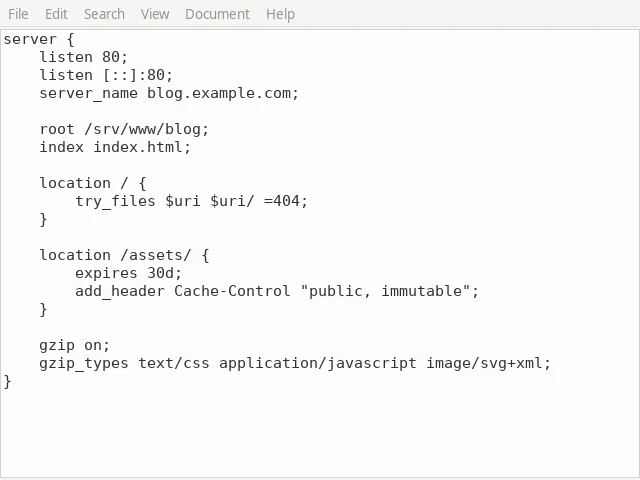
Shipping working in graphical apps on office-pc: each window switch, click, text entry and key press is listed alongside.

nginx.conf - Mousepad

Shipping is working

  1. Switch windowMousepad
  2. ClickFile › Save As
  3. Type textnginx.conf
  4. Press keyEnter

It changes what your settings allow, and acts as the member who asked.

It uses the identity and permissions of the member who started the chat. It can't see other people's projects and can't do anything that member couldn't. Whether a change pauses first is set for that chat; task runs and tool calls are recorded.

What limits it

  • Uses the requester's permissions, never more
  • Follows the approval setting, and you can reject anything
  • Elevation needs a person
  • Runs and calls are recorded

What you can do

  • Interrupt, take over or stop at any point
  • Change the model or the approval setting in the chat
  • Turn it into an automated task
  • Read what each run did

Also included

  • Where you talk to it

    The search box on every Console page, the full chat page, and WeChat, WeCom, Feishu, Telegram and Slack.

    WeChat by QR code

  • Operating Console pages

    Where it clicks and what it types are visible on the page, and you can take over.

    Visible cursor

  • Resources in the project

    Creates and changes instances, disks, networking and security groups, and writes DNS records.

    Same operations as the Console

  • Commands and files

    On Fleet machines it runs commands, reads and edits files and searches their contents as your account.

    Every step is listed

  • Graphical apps

    Reads windows and interface elements, then clicks, types, drags and presses keys.

    Computer Use

  • Scheduled tasks

    Run now, at a set time, on an interval, or on a cron expression.

    Written in the task

  • Event triggers

    Follow EventBus events, filtered with a CEL condition, and start when one arrives.

    Cooldown of at least 10 seconds

  • Approval before changes

    Automatic review, confirm each change, or run directly, chosen per chat.

    Can be changed at any time

  • Looking things up

    Searches the web and reads pages, citing them in the answer.

    Only when needed

  • Attachments and images

    Reads the documents and images you send, and generates images when asked.

    Drop them into the chat

  • Memory and skills

    Remembers preferences and ways of working in a project, so you don't explain them twice.

    Kept per project

  • Run history

    Each run records its steps, tool calls and results under the task.

    Readable afterwards

Pricing

No separate charge. Chats and tasks are billed by the models they use, through the project's model service.

How every product is billed

Details

Where you talk to it
The Console; WeChat, WeCom, Feishu, Telegram, Slack
Models
The project's model service; the model can be changed in the chat
Task triggers
Now, at a set time, on an interval, on cron, on EventBus events
Event conditions
CEL expressions; cooldown of at least 10 seconds
Approval
Automatic review, confirm each change, run directly
Billing
By the models it uses, through the project's model service
Permissions
Acts as the member who started the chat, never beyond their access

Questions

Will it change resources I didn't mean it to?

Whether a change pauses first is set for that chat. With confirm each change, every change shows its difference and waits for you, and you can interrupt, take over or reject at any point.

Which chat apps work?

WeChat, WeCom, Feishu, Telegram and Slack. WeChat connects by scanning a code with the account; the others use each platform's bot.

What happens if a task doesn't finish?

Each run records its steps and results under the task. A running task can be paused, resumed or cancelled, and event-triggered tasks have a cooldown so they don't fire repeatedly.

Which model does it use?

Shipping uses the project's model service, and the model can be changed in the chat. Model prices are in the calculator on the Model API page.

How is this different from using the Console myself?

It calls the same operations with the permissions of the member who asked. The difference is that you can describe the job in a sentence and watch it work through the project step by step.

Is it billed separately?

Shipping has no separate charge; chats and tasks are billed by the models they use. A top-up of at least US$1 is needed before you start using Leaflow.

Get started in the Console.

Top up at least US$1 before first use. After that, each product is billed at its public price.