Your own machines

Fleet

Use your own Linux machines in the browser. Apps open in their own windows, and copy and paste, dropping files and sound work as they do with local apps. Switch computers and pick up the same session.BillingNo separate charge. With automatic sudo review on, each review is billed as Model API usage.

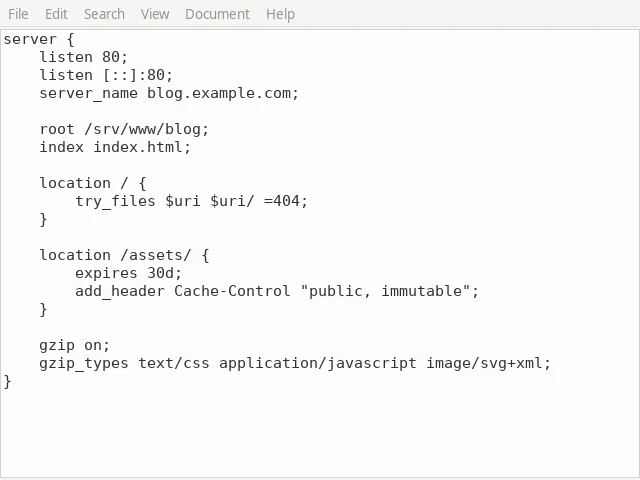
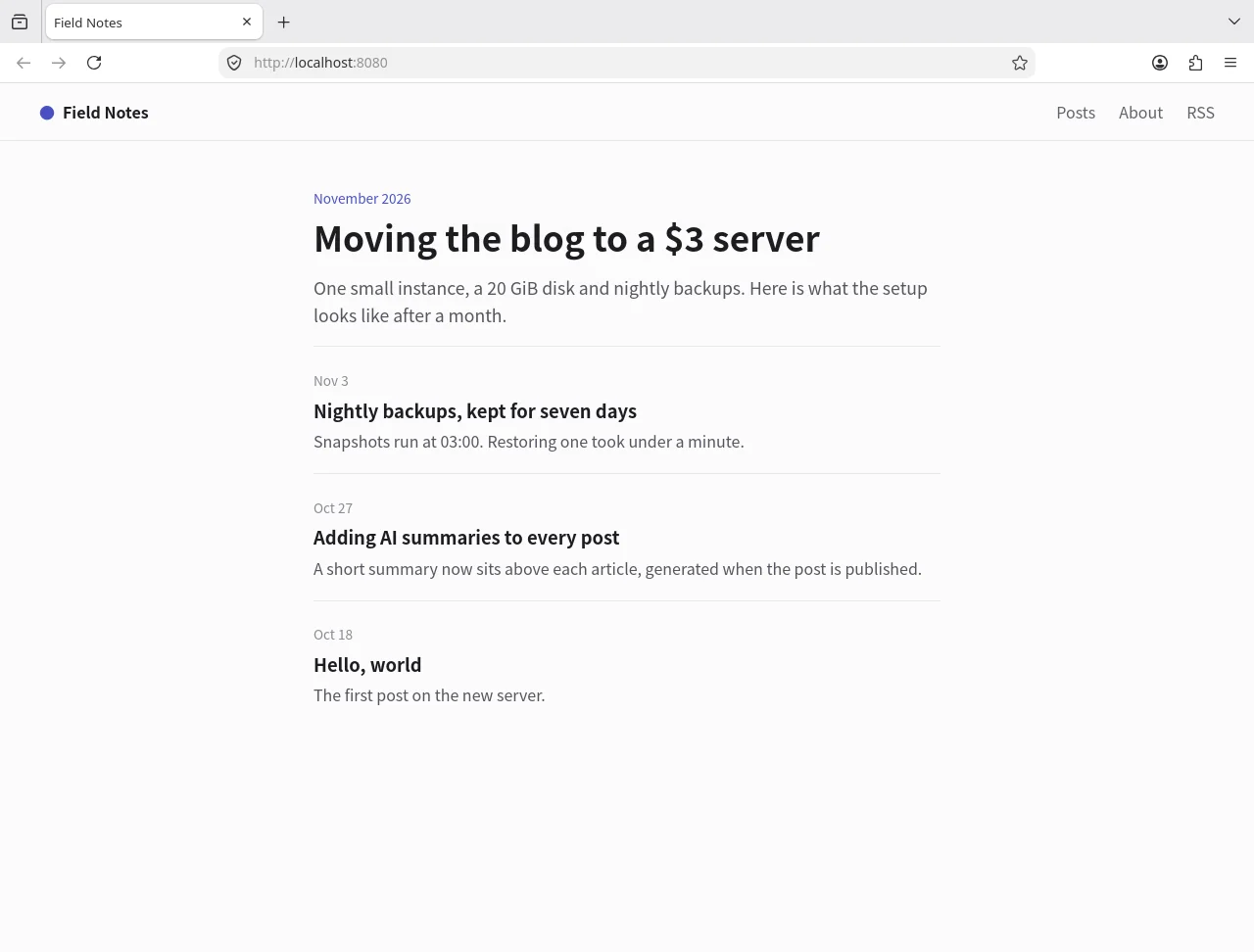
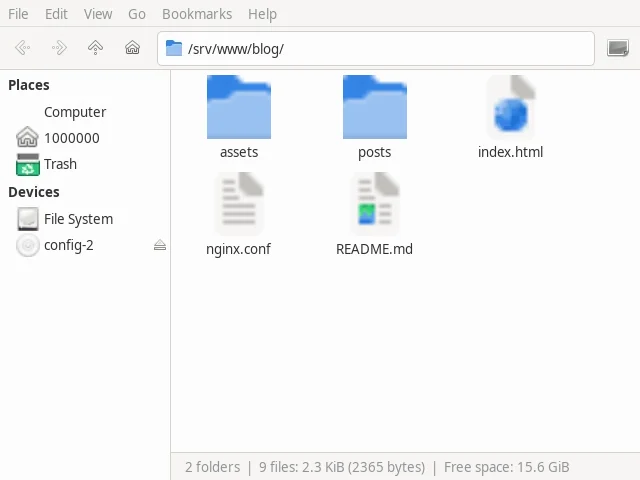
A Fleet desktop session: the machine’s browser, file manager and text editor, each in its own window.
web-018 msDirect
nginx.conf - Mousepad
Field Notes — Mozilla Firefox
blog - Thunar

At a glance

web-01Files · web-01
/srv/www/blog
NameSize
assets—
posts—
index.html1.2 KB
nginx.conf402 B
README.md118 B

Uploading 2 items to assets3.1 / 4.8 MB · 11.6 MB/s

The web terminal and file manager open in the panel at the bottom of the Console, and stay connected as you change pages.

Install with one command and pair with a code.

Run the install command on the machine and it prints a pairing code. Enter the code in the Console, check the hostname, source address and public key, and approve. The agent installs only what the terminal needs; choose the matching components at install time for graphical apps and sound.

  • Debian 13 or later, Ubuntu 24.04 or later, x86_64
  • For many machines, use a one-time registration token valid for 1, 8 or 24 hours
  • Tick “Join Leaflow Fleet” when you create a cloud server and it joins on first boot
Adding a machine: run the install command on it, then enter the pairing code in the Console, check the details and approve.

root@office-pc:~# curl -fsSL https://releases.leaflow.net/fleet-agent/install.sh | sh -s -- --enroll --with desktop,audio

Pairing code: 7KQ2M-X9D4P

Add machine

Hostname
office-pc
Source address
198.51.100.24
Public key
ed25519 · 3f9a…c41e
Nameoffice-pcApprove

No inbound ports. Peer to peer whenever possible.

The agent connects out to the platform. The browser and the machine connect over WebRTC, directly when they can and through a relay when they can't. The Console's performance panel shows which one you're on.

  • On the same network, a direct connection is usually single-digit milliseconds
  • You can pin the agent to a range of UDP ports if you need to
How a session connects: the browser and the machine connect peer to peer, through a relay when they can’t; the platform only handles signaling and authorization.
Leaflow platformSignaling and authorization
Your browser
Direct UDP · 8 ms
Your machineNo inbound ports

Peer to peer · end-to-end encrypted

RelayWhen a direct path fails

Terminal, files, screen and input are end-to-end encrypted.

Each end proves itself with an Ed25519 key, and the machine's key is pinned after the first connection.

End-to-end encrypted

  • Terminal and files
  • Screen, keyboard and mouse
  • Clipboard
  • Sound and microphone
  • Printing
  • Elevation approvals inside a session

Through the platform

  • Commands and output from Run command
  • sudo command lines approved on the platform
  • Arguments and results of MCP servers on the machine
  • Arguments, results and screenshots of Shipping's tool calls

Everyone signs in as themselves. No more shared root.

Bring members into the project and grant sign-in per person. Accounts come from Fleet's user directory, so each person has the same username and UID on every machine, and their home directory is created at first sign-in. sudo is granted separately. Revoke someone's sign-in and their sessions on the machine end at once; new sign-ins are refused.

  • Grant one machine, or all machines including ones added later
  • Switch terminal, files, clipboard, devices, printing, port forwarding and SSH agent on or off separately
  • Several people can share a session, watching or taking control
  • Accounts aren't written to /etc/passwd and don't apply where a local account has the same name
The Access tab for office-pc: three members each sign in with their own account, and sudo is granted separately.
Accessoffice-pc
MemberAccountSign insudoFilesClipboard
a[email protected]alice_example_com
b[email protected]bob_example_com
c[email protected]carol_example_com

Accounts come from the user directory, with the same username and UID on every machine; home directories are created at first sign-in.

sudo without a password, approved in the Console.

Run sudo in a terminal and the request appears there and at the top of every Console page, for you or a session participant with permission to approve. If nobody answers within 60 seconds, that sudo fails; it never falls back to a password.

  • Each person chooses per machine: ask every time, automatic review or approve all, for a set time or until changed
  • Automatic review calls a model once per request and refuses when it can't review
  • Graphical apps asking for admin rights (polkit) go through the same approval
web-01api-01

bob_example_com@web-01:~$ sudo nginx -t && sudo systemctl reload nginx

Waiting for approval on Leaflow or by a participant of this session.

Privilege requestsudo nginx -t && sudo systemctl reload nginxDenyApprove⌘↵

Shipping can use the graphical apps on your machine.

On machines with a virtual desktop, Shipping operates graphical apps: it reads windows, clicks, types, drags and presses keys, and every step is listed in the chat. When you're away from your desk, ask from a chat app.

  • MCP servers configured on the machine run as the account's own user
  • Your own agent can run commands and call tools through the Fleet API
Shipping working in graphical apps on office-pc: each window switch, click, text entry and key press is listed alongside.

nginx.conf - Mousepad

Shipping is working

  1. Switch windowMousepad
  2. ClickFile › Save As
  3. Type textnginx.conf
  4. Press keyEnter

Also included

  • Web terminal

    In the panel at the bottom of the Console, one tab per machine. It stays connected as you change pages, and the shell picks up where it left off after a reconnect.

    Ctrl and the backtick key toggle the panel

  • File manager

    Upload, download, copy, move and rename, with deletes going to the trash first. Downloaded folders keep their structure.

    Drop files in to upload

  • App windows

    One window per app, floating over any Console page and used like a local app.

    Up to 60 fps per person

  • Full desktop

    Open the desktop environment installed on the machine. Servers without a GPU work too, with software OpenGL.

    1920×1080 by default

  • Clipboard

    Text, HTML and images go both ways, and local files can be pasted onto the machine.

    Read only when you paste

  • Sound and microphone

    The machine's audio plays on your side, and you can lend your microphone to apps on the machine.

    Opus · 48 kHz

  • Gamepads

    Your gamepads appear on the machine with the standard layout.

    Up to 4 per person

  • Printing

    When an app on the machine prints, the job arrives in your browser as a PDF for the printer next to you.

    Up to 128 MiB per job

  • Port forwarding

    Forward TCP and UDP ports on the machine to reach services that only listen locally.

    Granted per person

  • SSH agent forwarding

    Use your local SSH keys on the machine without the keys ever reaching it.

    Granted per person

  • Shared sessions

    Several people join one session, watching or taking control.

    Up to 8 sessions per person per machine

  • Automatic updates

    Updates are signed, install after the machine has been idle for 2 minutes, and roll back if the health check fails.

    Sessions stay connected

Pricing

No separate charge. With automatic sudo review on, each review is billed as Model API usage.

How every product is billed

Details

Systems
Debian 13 or later, Ubuntu 24.04 or later; x86_64 (x86-64-v2)
Kernel
5.3 or later, with cgroup v2
Install
curl -fsSL https://releases.leaflow.net/fleet-agent/install.sh | sh -s -- --enroll
Optional components
--with desktop (virtual desktop, input methods and CJK fonts), --with audio (sound)
Connection
WebRTC, peer to peer first, through a TURN relay when needed; no inbound ports
Display
Up to 60 fps per person, 1920×1080 by default
Sessions
Up to 8 per account per machine, one of them a desktop; they keep running with nobody connected
User directory
Up to 10,000 accounts and 10,000 groups, with the same username and UID on every machine
sudo approval
A request not approved within 60 seconds fails

Questions

Does it support Windows or macOS?

On the machine side, Linux only for now: Debian 13 or later and Ubuntu 24.04 or later on x86_64. The computer you connect from only needs a browser.

Does the machine need a public IP or open ports?

No. The agent connects out to the platform, and the browser and the machine connect directly when they can, through a relay when they can't.

Can the platform see my screen and files?

No. Terminal, files, screen, input, clipboard, sound and printing are end-to-end encrypted between your browser and the machine. What passes through the platform is Run command input and output, sudo command lines approved on the platform, and the content of MCP servers and Shipping's tool calls.

Can a server without a GPU show a desktop?

Yes. The agent brings its own headless display server and renders OpenGL in software. A full desktop needs a desktop environment installed on the machine.

What happens when someone leaves the team?

Revoke their sign-in and their sessions on the machine end at once; new sign-ins are refused. Files they leave behind keep their owner.

Can I drag files from the machine back to my computer?

In the browser you can drag local files into an app window. Dragging both ways comes with the Fleet desktop client, which is coming soon.

Can I use my camera in the browser?

Not yet. Sound, microphone, clipboard, gamepads and printing all work.

How is it billed?

Fleet has no separate charge. With automatic sudo review on, each review is a Model API request billed by usage. A top-up of at least US$1 is needed before you start using Leaflow.

Get started in the Console.

Top up at least US$1 before first use. After that, each product is billed at its public price.